Pumpkin Playground Controls
Every core binding for the 2D physics sandbox, with mobile and console notes.
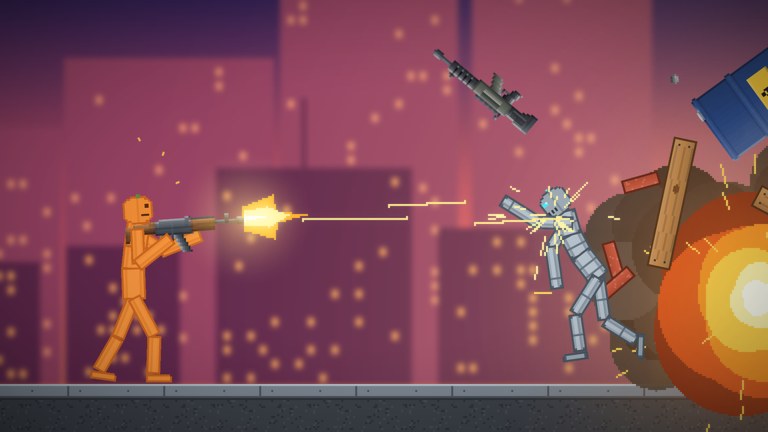
Mastering Pumpkin Playground is mostly about reading physics in real time. The official control set is short on purpose: grab the world, use an item, freeze time, slow it, inspect heat, undo mistakes, duplicate pieces, and open the catalog. This page expands each binding into practical habits for Shiny Burger’s sandbox so you are not hunting menus mid-explosion.
New to the game? Skim Getting Started first, then keep this tab open. Cross-links below point to Powers, Building and Wiring, Items and Weapons, and Maps Overview when a key matters most in those contexts.
PC control reference
| Input | Action | When you need it |
|---|---|---|
| Left click | Grab and fling | Move pumpkin people, props, weapons, and debris |
| F | Use item | Fire guns, swing blades, trigger bombs/nukes, activate held tools |
| Space | Pause | Freeze the sim to reposition, aim, or stop a cascade |
| G | Slow motion | Study limb breaks, shrapnel, and vehicle flips |
| T | Heat view | Visualize temperature when fire, lava, or electricity matter |
| Z | Undo | Roll back the last major placement or destructive oops |
| C | Copy | Duplicate a selected build piece or arrangement |
| V | Paste | Place the copied selection |
| Tab | Catalog | Spawn from 300+ items, people, vehicles, and parts |
These match the bindings published with the experience. If an update remaps a key, check the in-game help overlay and the Updates Hub.
Left click — grab and fling
Grab is the primary verb. Click and hold to pick up a pumpkin person or prop, drag to aim, and release to fling. Because limbs react independently, a poorly aimed fling can send an arm one way and a torso another—that is intended.
Tips
- Short flicks for precise placement on wiring benches; long throws for comedy launches into lava or sea maps.
- Grab bombs carefully. You can reposition an explosive before pressing
F. - In six-player servers, grabbing another player’s in-progress machine without asking starts fights. Pause and communicate.
Grab also helps after powers. A tornado or gravity flip scatters parts; pause (Space), then click pieces back into a pile before you paste a backup copy.
F — use item
Whatever you have equipped—gun, katana, Cluster Bomb, Pumpkin Nuke, or a specialized tool—activates with F. Treat F as “commit.” If you are unsure, pause first, aim with grab, then unpause and tap F.
Code rewards from the Codes Hub such as Cluster Bomb (PUMPKIN) and Pumpkin Nuke (BOOM) still use this same use key. Read How to Redeem Codes if STORE navigation is unclear, then return here for the fire button.
Vehicles (cars, tanks) combine catalog spawn, grab positioning, and F or context use depending on the asset. Test on a workshop floor before driving into a bunker full of friends’ builds. Deeper catalog notes sit in Items and Weapons.
Space — pause
Pause is not optional polish; it is a core sandbox lens. Hit Space when:
- Multiple pumpkin people collide and you want to inspect joints.
- A fire line approaches a battery you still need.
- You are framing a meteor shower or nuke for a clip.
- Another player asks for a moment before you earthquake the map.
While paused, you can still plan: open heat view, decide whether to undo, or prepare a copy of a clean subassembly. Unpause only when everyone in the six-person server is ready if you are sharing a delicate build.
G — slow motion
Slow motion stretches impacts so you can see bone breaks, ragdoll arcs, and shrapnel. Use it with melee contests, car hits, and power onsets (especially earthquake and tornado). Pair G with T when flames are involved so you see both motion and heat.
If slow-mo feels “stuck,” tap G again or toggle pause to reset your sense of time. Time stop as a power is different from slow motion as a control—powers are covered separately in Powers.
T — heat view
Heat view overlays temperature information so fire, lava map hazards, and electrical faults are readable. Turn it on before you:
- Combine fire with wired motors and lights.
- Fight on lava maps.
- Test acid or electricity near pumpkin people you still want intact for a second trial.
Building players should leave heat view bound in muscle memory; many “random” machine failures are heat propagating into a battery chain. See Building and Wiring.
Z — undo
Undo is your cheap checkpoint. Place a wall, hate the angle, hit Z. Spawn the wrong tank, hit Z. Trigger a power too early, hit Z if the sim still allows that rollback.
Do not treat undo as infinite time travel after minutes of chaos—stack depth is finite in practice—but it is far faster than rebuilding a staircase by hand. For long projects, copy stable milestones with C so you can paste them even if undo runs out.
C / V — copy and paste
Copy/paste turns Pumpkin Playground into a modular workshop.
- Build one clean module (ramp, room, battery-light pair).
- Select and press
C. - Move your view and press
Vto stamp duplicates. - Pause between pastes if physics tries to settle overlapping colliders.
This workflow matters on maps with ready-made houses, towers, and bunkers: duplicate interior rooms, mirror defensive walls, or clone a trap hallway. On Moon or sea maps, paste ballast or platforms in grids so vehicles have somewhere to land.
Tab — catalog
Tab opens the catalog: pumpkin people, 300+ items, vehicles, and building parts. Learn the category layout early so you are not scrolling while a fire spreads.
Catalog habits
- Spawn test dummies in batches, not one at a time, when comparing weapons.
- Keep a “safe kit” mental list: basic melee, small explosive, extinguisher-like tools if available, battery, motor, light.
- After redeeming codes, confirm new explosives appear here before you assume the reward failed.
Mobile, tablet, and console
Pumpkin Playground is built to play on PC, Mobile, Tablet, and Console. Touch and controller clients expose the same actions through on-screen buttons or radial prompts:
- Grab/fling maps to press-and-drag on the playfield.
- Use item appears as an action button (the spiritual
F). - Pause, slow motion, heat view, undo, and catalog sit in the HUD or a tools drawer—labels match the PC names even when glyphs differ.
- Copy/paste may live behind a build menu on smaller screens; rotate to landscape for more HUD room.
If a binding is missing after an update, open the in-experience controls sheet before assuming the feature was removed. Console text entry for codes still uses the platform keyboard; redemption steps are on How to Redeem Codes.
Control combos worth practicing
- Pause → heat view → undo — Stop a bad fire, inspect, roll back.
- Slow-mo → use item — Fire a gun or swing a katana while reading limb reactions.
- Copy module → paste grid → light power — Stamp a structure, then stress-test with tornado or quake.
- Grab bomb → pause aim → F — Precision explosives without panic throws.
- Catalog spawn → grab into vehicle → map change mindset — Load a car or tank appropriate to workshop versus Moon.
Soft skills in six-player servers
Inputs are local, but consequences are shared. Agree on pause etiquette. Announce nukes. Do not paste over someone’s wiring. When conflicts happen, undo and rebuild beats leaving the server—visits are already in the millions with busy concurrency, so good lobbies are worth keeping.
Practice these bindings on a quiet workshop map for fifteen minutes and every other guide on this wiki becomes easier. Controls are the language; powers, items, and maps are the sentences you write with them.
Frequently Asked Questions
Quick answers for Pumpkin Playground players.
What key uses items in Pumpkin Playground on PC?
F uses the equipped item—guns, swords, bombs, nukes, and other tools. Pause first if you need time to aim.
How do I pause or slow the simulation?
Space pauses. G toggles slow motion. Use both to study limb physics and to protect builds before big powers.
What does heat view do?
T toggles heat view so you can see temperature influence from fire, lava, and related hazards while wiring or fighting.
How do copy and paste work?
Select a build piece, press C to copy, then V to paste duplicates. Pause between pastes if overlapping physics misbehave.
Are controls the same on mobile?
Actions match, but mobile and console use on-screen buttons instead of keyboard keys. Look for the same labels: pause, slow motion, catalog, undo.